
/habit list
Send an embed message with a list of your created habits. Use this command to quickly view all your active habits, including their names, descriptions, frequency, and scheduled times.
 Usage
Usage
/habit list
No options or inputs are required—just run the command to see your habit list.
 Example
/habit list
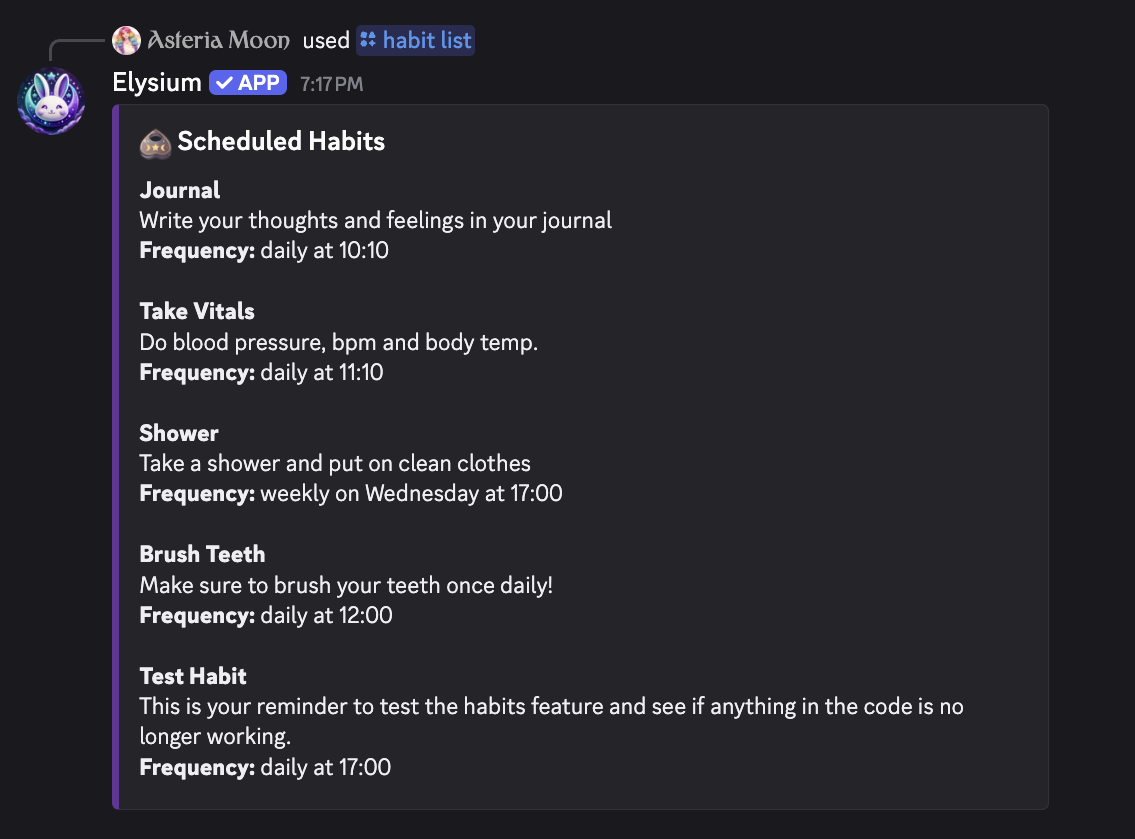
This will:
- Display an embed in your current channel or DM showing all of your habits
- List each habit’s name, description, whether it’s daily or weekly, and its scheduled time
- Provide a clear overview of what habits you’re currently tracking
 Notes
Notes
- Only shows habits you’ve created for your account
- Does not display streaks or completion history—focuses on habit details only
- Great for reviewing your current routine or deciding which habits to reschedule or remove
- Use related commands to edit, reschedule, or remove habits as needed
 Related Commands
/habit add – Add a new daily or weekly habit
/habit remove – Delete a habit
/habit reschedule – Change a habit’s scheduled time
/habit stats – View detailed statistics for a habit
/habit points – See your habit XP or points